> For the complete documentation index, see [llms.txt](https://burple.gitbook.io/burple/llms.txt). Markdown versions of documentation pages are available by appending `.md` to page URLs; this page is available as [Markdown](https://burple.gitbook.io/burple/thehackerslabs/facil/grillo.md).

# Grillo

<figure><img src="/files/8S6YjAA9vhCLDaeNnEmn" alt=""><figcaption></figcaption></figure>

## Fase de reconocimiento

Primero hacemos un escaneo de nmap el cual revela los siguientes puertos abiertos:

`nmap -p- --min-rate 10000 192.168.8.105`

* 22 (SSH)
* 80 (HTTP)

<figure><img src="/files/WXbpsqjLOJxunMPHIjzr" alt=""><figcaption></figcaption></figure>

En el puerto 80 podemos encontrar la página por defecto de apache:

<figure><img src="/files/PQPXZ04BkfuwNeSNnC0o" alt=""><figcaption></figcaption></figure>

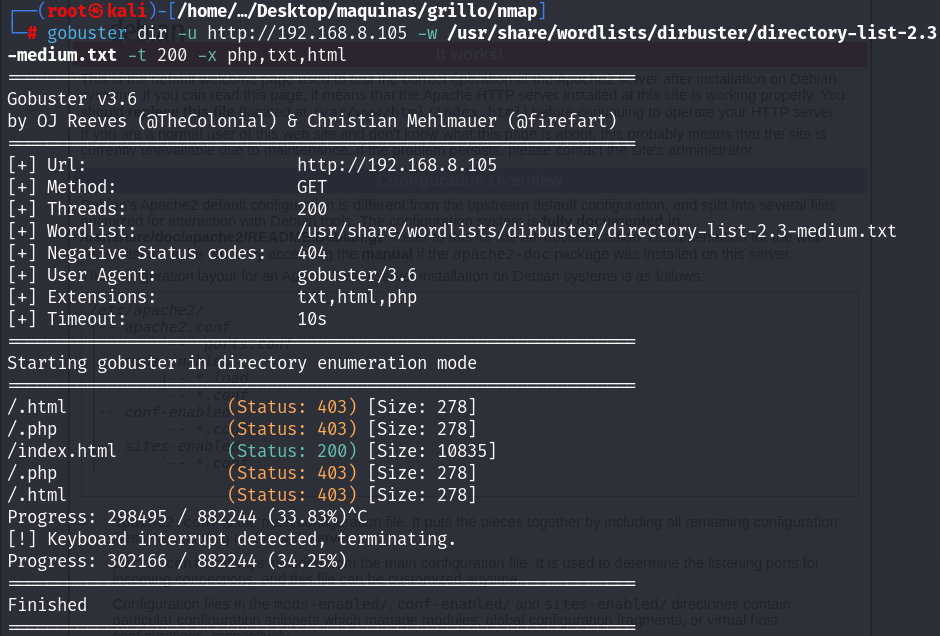
Intento hacer fuzzing con gobuster pero no encuentro nada relevante:

<figure><img src="/files/wKewjKwsVjMi3kr36TUe" alt=""><figcaption></figcaption></figure>

Si os fijáis bien en el contenido de la página de apache en su interior podemos encontrar la siguiente pista (No me di cuenta que también esta al final de la pagina en texto visible):

<figure><img src="/files/ZfRDOT4CqYyp8QT84Wqp" alt=""><figcaption></figcaption></figure>

<figure><img src="/files/BxtfLA3OvBtzHLyVEAAy" alt=""><figcaption></figcaption></figure>

## Fase de intrusión

Esto nos sugiere que existe un usuario llamado melanie con el cual podemos acceder al puerto ssh, así que nos vamos a disponer a hacer fuerza

<figure><img src="/files/zQugFYTG23wBqH7YxauP" alt=""><figcaption></figcaption></figure>

## Escalada de privilegios

Iniciamos sesión por el puerto ssh con los credenciales obtenidos y hacemos un sudo -l  los permisos que tiene cada usuario y podemos ver que root puede ejecutar puttygen, miro el --help de puttygen y se me viene a la cabeza la idea de crearme una key de ssh y hacer que el output sea el de /root/.ssh/authorized\_keys, para así poder iniciar sesión como root con la key privada de ssh generada

<figure><img src="/files/wLdWsycJm25dI3pnkPEu" alt=""><figcaption></figcaption></figure>

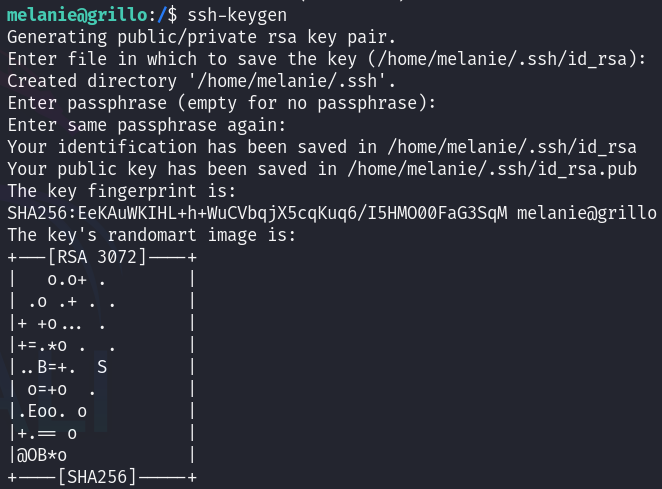
Nos creamos nuestra key:

<figure><img src="/files/jfNA3sbToYwGZ8wv2lno" alt=""><figcaption></figcaption></figure>

Iniciamos sesión con la key y nos funciona, somos root!

<figure><img src="/files/9wsN5j7DqXkAi3wOrES1" alt=""><figcaption></figcaption></figure>

## Conclusión

En esta máquina, logramos la intrusión y escalada de privilegios aprovechando varias debilidades:

* Un usuario el cual era proporcionado intencionalmente y que le hicimos fuerza bruta para dar con los credenciales correctos mediante ssh usando **hydra**
* Luego logramos ser root ya que melanie tenia permisos para ejecutar puttygen como root, así que solo tuvimos que crearnos una key de **ssh** y colocarla en "/root/.ssh/authorized\_keys" mediante  los permisos mal configurados de **puttygen**&#x20;

Ha sido una maquina bastante sencillita, bastante chill, esta bien si eres nuevo en el pentesting


---

# Agent Instructions
This documentation is published with GitBook. GitBook is the documentation platform designed so that both humans and AI agents can read, navigate, and reason over technical content effectively. Learn more at gitbook.com.

## Querying This Documentation
If you need additional information that is not directly available in this page, you can query the documentation dynamically by asking a question.

Perform an HTTP GET request on the current page URL with the `ask` query parameter, and the optional `goal` query parameter:

```
GET https://burple.gitbook.io/burple/thehackerslabs/facil/grillo.md?ask=<question>&goal=<endgoal>
```

`ask` is the immediate question: it should be specific, self-contained, and written in natural language.
`goal` is optional and describes the broader end goal you are ultimately trying to accomplish on behalf of the user. GitBook uses it to tailor the answer towards what is most useful for that goal.

The response will contain a direct answer to the question and relevant excerpts and sources from the documentation.

Use this mechanism when the answer is not explicitly present in the current page, you need clarification or additional context, or you want to retrieve related documentation sections.